Prevalence of Presence (POP) Analysis in PhIP-seq
Source:vignettes/pop-analysis.Rmd
pop-analysis.RmdOverview
POP (Prevalence Of Presence) measures how often each feature is
detected across the samples in a group. For each
(rank, feature, group pair) the analysis asks: does the
fraction of samples carrying this feature differ between the two
groups?
This vignette walks through the complete POP workflow in phiper:
- Computing prevalence and p-values with
compute_pop() - Visualising results as scatter plots with
scatter_static()andscatter_interactive() - Volcano plots with
volcano_static()andvolcano_interactive()
Setup
Load the bundled example dataset. It contains two patient groups
(A, B) measured at two timepoints
(T1, T2) across 1 000 simulated peptides.
pd <- load_example_data()
#> [17:16:19] INFO  Constructing <phip_data> object
#>                  -> create_data()
#> [17:16:19] INFO  Fetching peptide metadata library via get_peptide_library()
#>                    - libraries: combined
#> [17:16:19] INFO  Retrieving peptide metadata into DuckDB cache
#>                  -> get_peptide_library(library = combined, force_refresh =
#>                     FALSE)
#> [17:16:19] INFO  Opened DuckDB connection
#>                    - cache dir:
#>                      /home/runner/.cache/R/phiperio/peptide_meta/phip_cache.duckdb
#>                    - tables: peptide_meta_combined
#> [17:16:19] OK    Using cached peptide_meta_combined (fast path)
#> [17:16:19] OK    Retrieving peptide metadata into DuckDB cache - done
#>                  -> elapsed: 0.046s
#> [17:16:19] OK    Peptide metadata acquired
#> [17:16:19] INFO  Validating <phip_data>
#>                  -> validate_phip_data()
#> [17:16:19] INFO  Checking structural requirements (shape & mandatory columns)
#> [17:16:19] INFO  Checking outcome family availability (exist / fold_change /
#>                  raw_counts)
#> [17:16:19] INFO  Checking collisions with reserved names
#>                    - subject_id, sample_id, timepoint, peptide_id, exist,
#>                      fold_change, counts_input, counts_hit
#> [17:16:19] INFO  Ensuring all columns are atomic (no list-cols)
#> [17:16:19] INFO  Checking key uniqueness
#> [17:16:19] INFO  Validating value ranges & types for outcomes
#> [17:16:19] INFO  Assessing sparsity (NA/zero prevalence vs threshold)
#>                    - warn threshold: 50%
#> [17:16:19] INFO  Checking peptide_id coverage against peptide_library
#> [17:16:20] INFO  Checking full grid completeness (peptide * sample)
#> [17:16:20] INFO  Counts table is not a full peptide * sample grid
#>                    - observed rows: 78200
#>                    - expected rows: 156000
#> [17:16:20] OK    Validating <phip_data> - done
#>                  -> elapsed: 0.461s
#> [17:16:20] OK    Constructing <phip_data> object - done
#>                  -> elapsed: 0.553s
pd
#> ── <phip_data> ─────────────────────────────────────────────────────────────────
#>
#> counts (first 5 rows):
#> # A tibble: 5 × 9
#>   sample_id subject_id group timepoint peptide_id     exist counts_control
#>   <chr>     <chr>      <chr> <chr>     <chr>          <int>          <int>
#> 1 B_T1_1    1          B     T1        agilent_100642     0             16
#> 2 B_T1_1    1          B     T1        agilent_100997     1             18
#> 3 B_T1_1    1          B     T1        agilent_10133      0             15
#> 4 B_T1_1    1          B     T1        agilent_101516     0             29
#> 5 B_T1_1    1          B     T1        agilent_101615     0             16
#> # ℹ 2 more variables: counts_hits <int>, fold_change <dbl>
#>
#> table size: 78,200 rows x 9 columns
#>
#> peptide library preview (first 5 rows):
#> # A tibble: 5 × 8
#>   peptide_id    Fullname                 species genus family order class common
#>   <chr>         <chr>                    <chr>   <chr> <chr>  <chr> <chr> <chr>
#> 1 agilent_1     Chromodomain-helicase-D… Homo s… Homo  Homin… Prim… Mamm… Human
#> 2 agilent_10    Lipase 2 precursor (Gly… Staphy… Stap… Staph… Baci… Baci… NA
#> 3 agilent_100   cell surface protein pr… Porphy… Porp… Porph… Bact… Bact… NA
#> 4 agilent_1000  Coagulation factor VIII… Homo s… Homo  Homin… Prim… Mamm… Human
#> 5 agilent_10000 transmembrane serine/th… Mycoba… Myco… Mycob… Myco… Acti… NA
#> ... plus 37 more columns
#>
#> library size: 357,190 rows x 45 columns
#>
#> meta flags:
#>   con:            <duckdb_connection>
#>   peptide_libraries: combined
#>   longitudinal:   TRUE
#>   exist:          TRUE
#>   fold_change:    TRUE
#>   raw_counts:     FALSE
#>   extra_cols:     group, counts_control, counts_hits
#>   peptide_con:    <duckdb_connection>
#>   materialise_table: TRUE
#>   finalizer_env:  <environment>
#>   full_cross:     FALSE
Note. The example data are entirely simulated and have no biological meaning. They exist solely to demonstrate the API.
Computing prevalence: compute_pop()
Unpaired design — group comparison
The workhorse function is compute_pop(). Supply a
phip_data object, the rank(s) at which prevalence should be
aggregated, and the binary grouping column(s).
pop_group <- compute_pop(
  pd,
  rank_cols  = "peptide_id",
  group_cols = "group"
)
#> [17:16:20] INFO  compute_pop
#> [17:16:20] INFO  compute_pop
#>                    - ranks : peptide_id
#>                    - group_cols: group
#>                    - exist_col : exist
#>                    - pop_k_min : 1
#>                    - paired : FALSE
#> [17:16:20] INFO  ranks resolved
#>                    - available: peptide_id
#> [17:16:20] INFO  computing cohort sizes and validating binary group_cols
#> [17:16:20] INFO  computing presence per sample via k-of-n rule
#> [17:16:20] INFO  counting present samples per feature (pop, unpaired)
#> [17:16:20] INFO  building pairwise comparisons
#> [17:16:22] OK    materialized; computing Fisher p-values
#>                    - table: ph_pop_20261006_171620
#> [17:16:22] OK    done (compute_pop, unpaired)
#>                    - rows : 1950
#>                    - ranks : peptide_id
#>                    - k_min : 1
#> [17:16:22] OK    compute_pop - done
#>                  -> elapsed: 2.53s
The result is a plain data.frame with one row per
(rank, feature, group pair):
head(pop_group)
#>         rank        feature group_col group1 n1 N1 prop1 percent1 group2 n2 N2
#> 1 peptide_id agilent_100642     group      A  0 38     0        0      B  8 42
#> 2 peptide_id agilent_100997     group      A  0 38     0        0      B  6 42
#> 3 peptide_id  agilent_10133     group      A  0 38     0        0      B  5 42
#> 4 peptide_id agilent_101516     group      A  0 38     0        0      B 17 42
#> 5 peptide_id agilent_101615     group      A  0 38     0        0      B  9 42
#> 6 peptide_id agilent_101998     group      A  0 38     0        0      B 11 42
#>       prop2 percent2      ratio delta_ratio        p_raw n_peptides
#> 1 0.1904762 19.04762 0.06907895   -6.238095 5.758809e-03          1
#> 2 0.1428571 14.28571 0.09210526   -4.428571 2.664380e-02          1
#> 3 0.1190476 11.90476 0.11052632   -3.523810 5.626494e-02          1
#> 4 0.4047619 40.47619 0.03250774  -14.380952 2.792824e-06          1
#> 5 0.2142857 21.42857 0.06140351   -7.142857 2.625712e-03          1
#> 6 0.2619048 26.19048 0.05023923   -8.952381 5.233874e-04          1
What’s in the output?
| Column | Description |
|---|---|
rank |
Rank at which the feature is defined
(e.g. "peptide_id") |
feature |
Feature identifier |
group_col |
Name of the grouping column |
group1, group2
|
The two group labels being compared |
n1, N1
|
Positives and total samples in group 1 |
prop1, percent1
|
Prevalence in group 1 (proportion and percentage) |
n2, N2
|
Positives and total samples in group 2 |
prop2, percent2
|
Prevalence in group 2 |
ratio |
prop1 / prop2 (with small-sample epsilon
correction) |
delta_ratio |
Signed fold-change: prop1/prop2 − 1 (or its
negative) |
p_raw |
Fisher’s exact test p-value (unpaired) |
n_peptides |
Number of peptides contributing to this feature |
Multiple group columns
Pass a character vector to group_cols to test several
grouping variables in one call.
pop_multi <- compute_pop(
  pd,
  rank_cols  = "peptide_id",
  group_cols = c("group", "timepoint")
)
#> [17:16:22] INFO  compute_pop
#> [17:16:22] INFO  compute_pop
#>                    - ranks : peptide_id
#>                    - group_cols: group, timepoint
#>                    - exist_col : exist
#>                    - pop_k_min : 1
#>                    - paired : FALSE
#> [17:16:22] INFO  ranks resolved
#>                    - available: peptide_id
#> [17:16:23] INFO  computing cohort sizes and validating binary group_cols
#> [17:16:23] INFO  computing presence per sample via k-of-n rule
#> [17:16:23] INFO  counting present samples per feature (pop, unpaired)
#> [17:16:23] INFO  building pairwise comparisons
#> [17:16:25] OK    materialized; computing Fisher p-values
#>                    - table: ph_pop_20261006_171623
#> [17:16:27] OK    done (compute_pop, unpaired)
#>                    - rows : 3900
#>                    - ranks : peptide_id
#>                    - k_min : 1
#> [17:16:27] OK    compute_pop - done
#>                  -> elapsed: 4.183s

# One block of rows per group column
table(pop_multi$group_col)
#>
#>     group timepoint
#>      1950      1950
Multiple ranks
rank_cols accepts any column present in the peptide
library. Pass "peptide_id" for peptide-level results, or
taxonomic rank columns (e.g. "family",
"genus") for higher-level aggregation.
Note on this toy example. The synthetic peptides do not map to real library annotations, so all higher-rank columns are empty. In a real PhIP-seq experiment,
family- andgenus-level rows reflect the taxonomic breadth of each patient’s reactivity.
pop_tax <- compute_pop(
  pd,
  rank_cols  = c("peptide_id", "family", "genus"),
  group_cols = "group"
)
table(pop_tax$rank)
k-of-n presence threshold
By default a sample is called positive for a feature if at least one
of its contributing peptides is present (pop_k_min = 1).
Raise this threshold to require, say, at least two peptides before
calling a sample positive — useful for filtering out singleton hits.
pop_k2 <- compute_pop(
  pd,
  rank_cols  = "peptide_id",
  group_cols = "group",
  pop_k_min  = 2L
)
#> [17:16:27] INFO  compute_pop
#> [17:16:27] INFO  compute_pop
#>                    - ranks : peptide_id
#>                    - group_cols: group
#>                    - exist_col : exist
#>                    - pop_k_min : 2
#>                    - paired : FALSE
#> [17:16:27] INFO  ranks resolved
#>                    - available: peptide_id
#> [17:16:27] INFO  computing cohort sizes and validating binary group_cols
#> [17:16:27] INFO  computing presence per sample via k-of-n rule
#> [17:16:27] INFO  counting present samples per feature (pop, unpaired)
#> [17:16:27] INFO  building pairwise comparisons
#> [17:16:29] OK    materialized; computing Fisher p-values
#>                    - table: ph_pop_20261006_171627
#> [17:16:29] OK    done (compute_pop, unpaired)
#>                    - rows : 0
#>                    - ranks :
#>                    - k_min : 2
#> [17:16:29] OK    compute_pop - done
#>                  -> elapsed: 2.013s

# Higher k_min → fewer positives
mean(pop_k2$n1) < mean(pop_group$n1)
#> [1] NA
Paired design — timepoint comparison
When the same subjects are measured at two timepoints, the paired design uses McNemar’s exact binomial test instead of Fisher’s exact test, which is more powerful because it accounts for within-subject correlation.
Set paired to the name of the column that links samples
from the same subject across timepoints.
pop_paired <- compute_pop(
  pd,
  rank_cols  = "peptide_id",
  group_cols = "timepoint",
  paired     = "subject_id"
)
#> [17:16:29] INFO  compute_pop
#> [17:16:29] INFO  compute_pop
#>                    - ranks : peptide_id
#>                    - group_cols: timepoint
#>                    - exist_col : exist
#>                    - pop_k_min : 1
#>                    - paired : subject_id
#> [17:16:29] INFO  ranks resolved
#>                    - available: peptide_id
#> [17:16:29] INFO  computing cohort sizes and validating binary group_cols
#> [17:16:29] INFO  computing presence per sample via k-of-n rule
#> [17:16:29] INFO  paired design: running McNemar exact (binomial)
#> [17:16:31] OK    done (compute_pop, paired)
#>                    - rows : 1950
#>                    - ranks : peptide_id
#>                    - k_min : 1
#> [17:16:31] OK    compute_pop - done
#>                  -> elapsed: 2.023s

head(pop_paired)
#>         rank        feature group_col group1 n1 N1      prop1  percent1 group2
#> 1 peptide_id agilent_100642 timepoint     T1  2 19 0.10526316 10.526316     T2
#> 2 peptide_id agilent_100997 timepoint     T1  2 19 0.10526316 10.526316     T2
#> 3 peptide_id  agilent_10133 timepoint     T1  1 19 0.05263158  5.263158     T2
#> 4 peptide_id agilent_101516 timepoint     T1  6 19 0.31578947 31.578947     T2
#> 5 peptide_id agilent_101615 timepoint     T1  1 19 0.05263158  5.263158     T2
#> 6 peptide_id agilent_101998 timepoint     T1  3 19 0.15789474 15.789474     T2
#>   n2 N2     prop2 percent2    p_raw n_peptides
#> 1  6 19 0.3157895 31.57895 0.125000          1
#> 2  4 19 0.2105263 21.05263 0.625000          1
#> 3  4 19 0.2105263 21.05263 0.250000          1
#> 4  8 19 0.4210526 42.10526 0.687500          1
#> 5  8 19 0.4210526 42.10526 0.015625          1
#> 6  6 19 0.3157895 31.57895 0.250000          1
The paired output does not include ratio or
delta_ratio — the test statistic is the McNemar
discordant-pair ratio, which is reflected in p_raw.
names(pop_paired)
#>  [1] "rank"       "feature"    "group_col"  "group1"     "n1"
#>  [6] "N1"         "prop1"      "percent1"   "group2"     "n2"
#> [11] "N2"         "prop2"      "percent2"   "p_raw"      "n_peptides"
Scatter plots
Scatter plots compare the prevalence of every feature in group 1 (x-axis) against group 2 (y-axis). Points on the diagonal represent features with equal prevalence across groups; deviations indicate differential carriage.
scatter_static() — ggplot2
The simplest call takes the compute_pop() result
directly. Coloring is determined automatically from BH-corrected
p-values: "significant (BH)", "nominal only",
"not significant".
scatter_static(pop_group)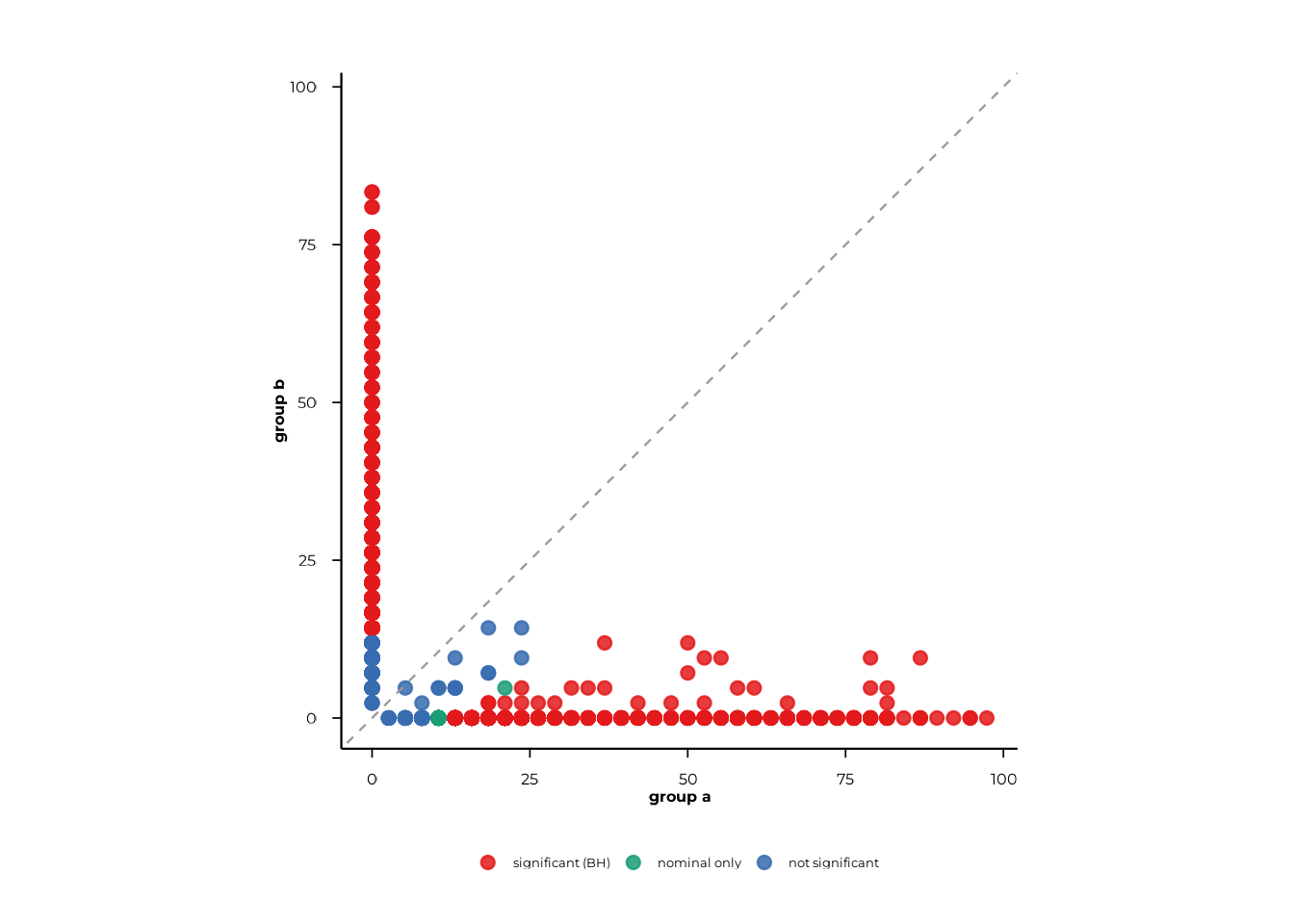
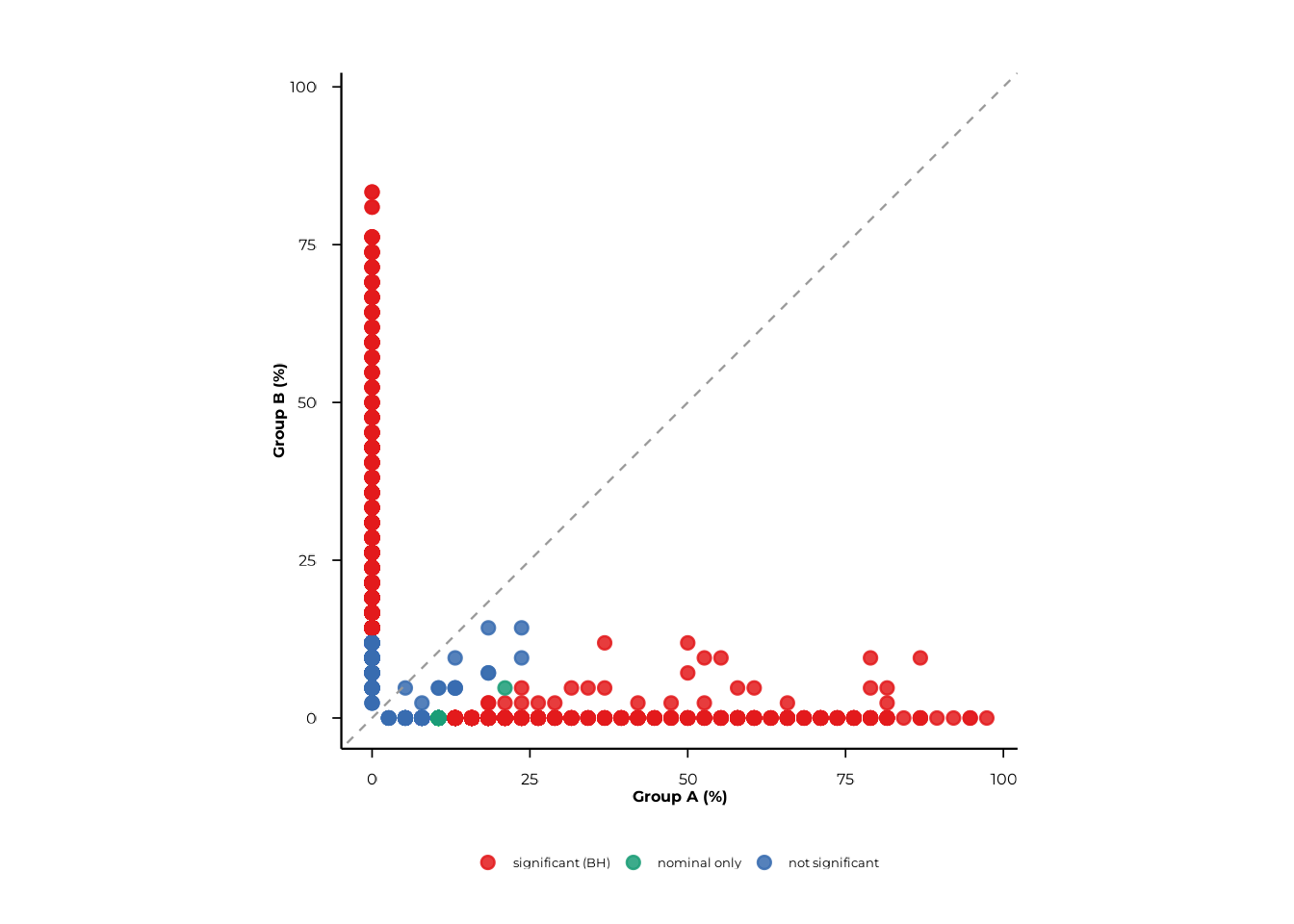
Use pair to restrict the plot to a specific group
contrast and xlab/ylab to label the axes.
scatter_static(
  pop_group,
  pair  = c("A", "B"),
  xlab  = "Group A (%)",
  ylab  = "Group B (%)",
  alpha = 0.05
)
Pass rank to display a single rank when the result
contains multiple ranks.
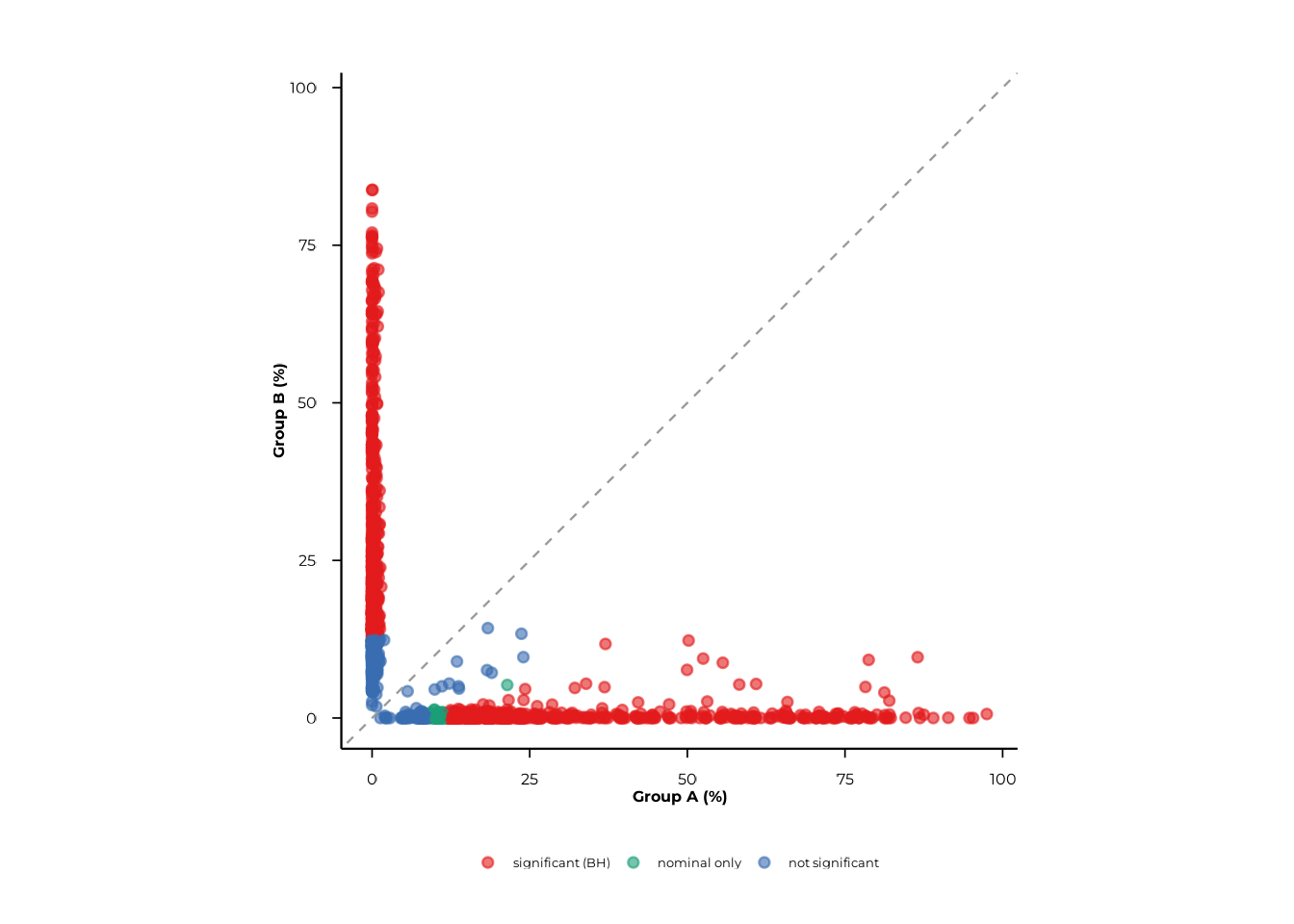
scatter_static(pop_tax, rank = "family", pair = c("A", "B"))Graphical parameters are passed via ...:
| Parameter | Default | Effect |
|---|---|---|
point_size |
2 | Point diameter |
point_alpha |
0.85 | Point opacity |
jitter_width_pp |
0 | Horizontal jitter (percentage points) |
jitter_height_pp |
0 | Vertical jitter (percentage points) |
font_size |
12 | Base font size |
scatter_static(
  pop_group,
  pair             = c("A", "B"),
  xlab             = "Group A (%)",
  ylab             = "Group B (%)",
  point_size       = 1.5,
  point_alpha      = 0.6,
  jitter_width_pp  = 0.5,
  jitter_height_pp = 0.5
)
color_by—scatter_static()also accepts acolor_bynamed vector (e.g.c("species" = "Staphylococcus aureus")) to highlight points by peptide-library metadata. This requires a real peptide library with matching annotations and is not demonstrated here.
scatter_interactive() — plotly
The interactive version mirrors the static API and returns a plotly widget suitable for HTML reports and Shiny dashboards. Hovering over a point shows its feature identifier, raw counts, prevalence percentages, and p-values.
scatter_interactive(
  pop_group,
  pair  = c("A", "B"),
  xlab  = "Group A (%)",
  ylab  = "Group B (%)",
  alpha = 0.05
)
An optional background_df argument lets you overlay a
second set of points (e.g. all peptides from a different comparison) as
a grey reference layer:
scatter_interactive(
  pop_group,
  pair            = c("A", "B"),
  background_df   = pop_multi[pop_multi$group_col == "timepoint", ],
  show_background = TRUE,
  background_name = "timepoint background"
)
Volcano plots
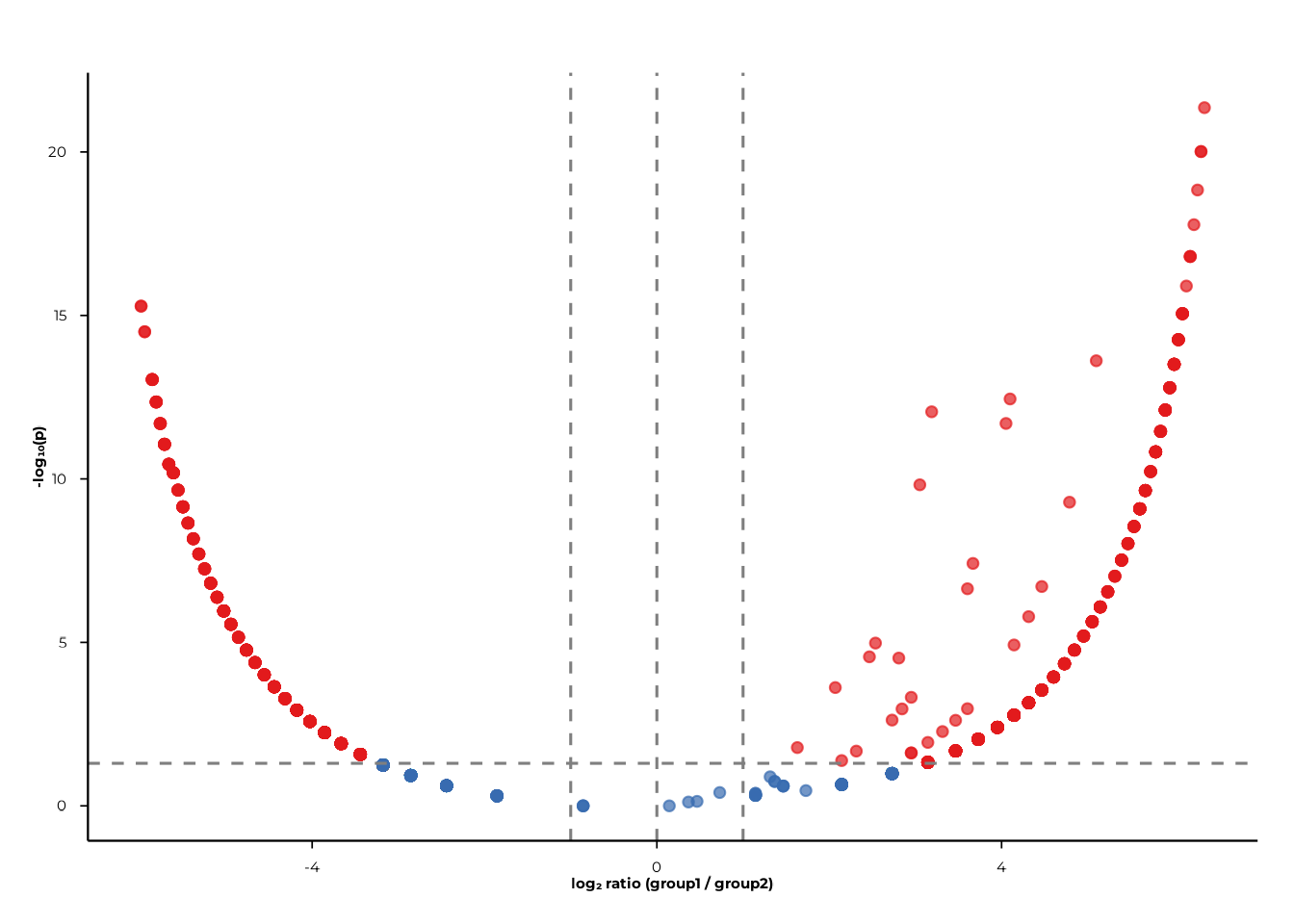
Volcano plots display log₂ ratio (x-axis) against −log₁₀(p) (y-axis), making it easy to spot features with both large effect sizes and small p-values.
volcano_static() — ggplot2
volcano_static(pop_group)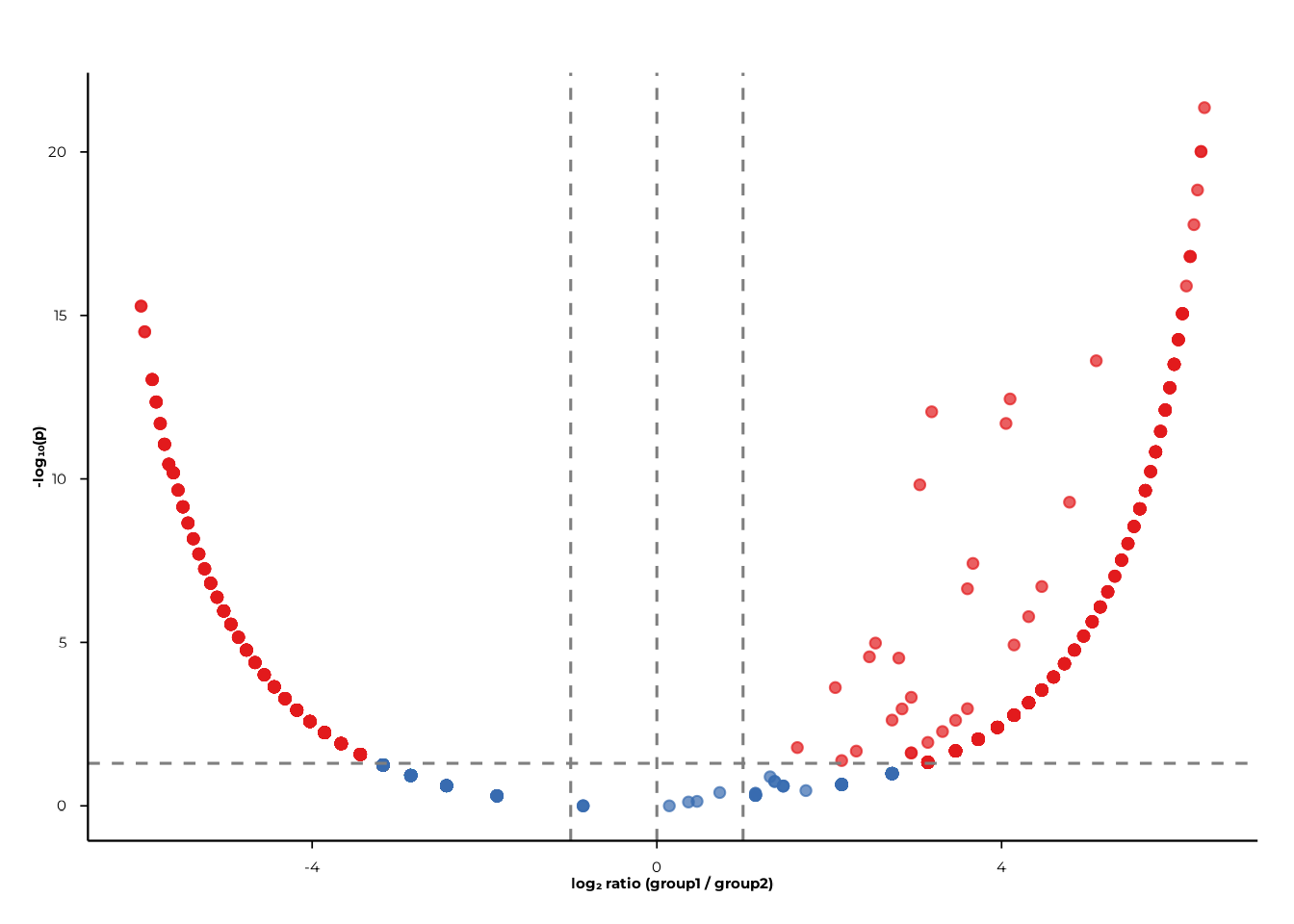
Filter to a specific contrast and rank with pair and
rank:
volcano_static(
  pop_group,
  pair = c("A", "B"),
  rank = "peptide_id"
)
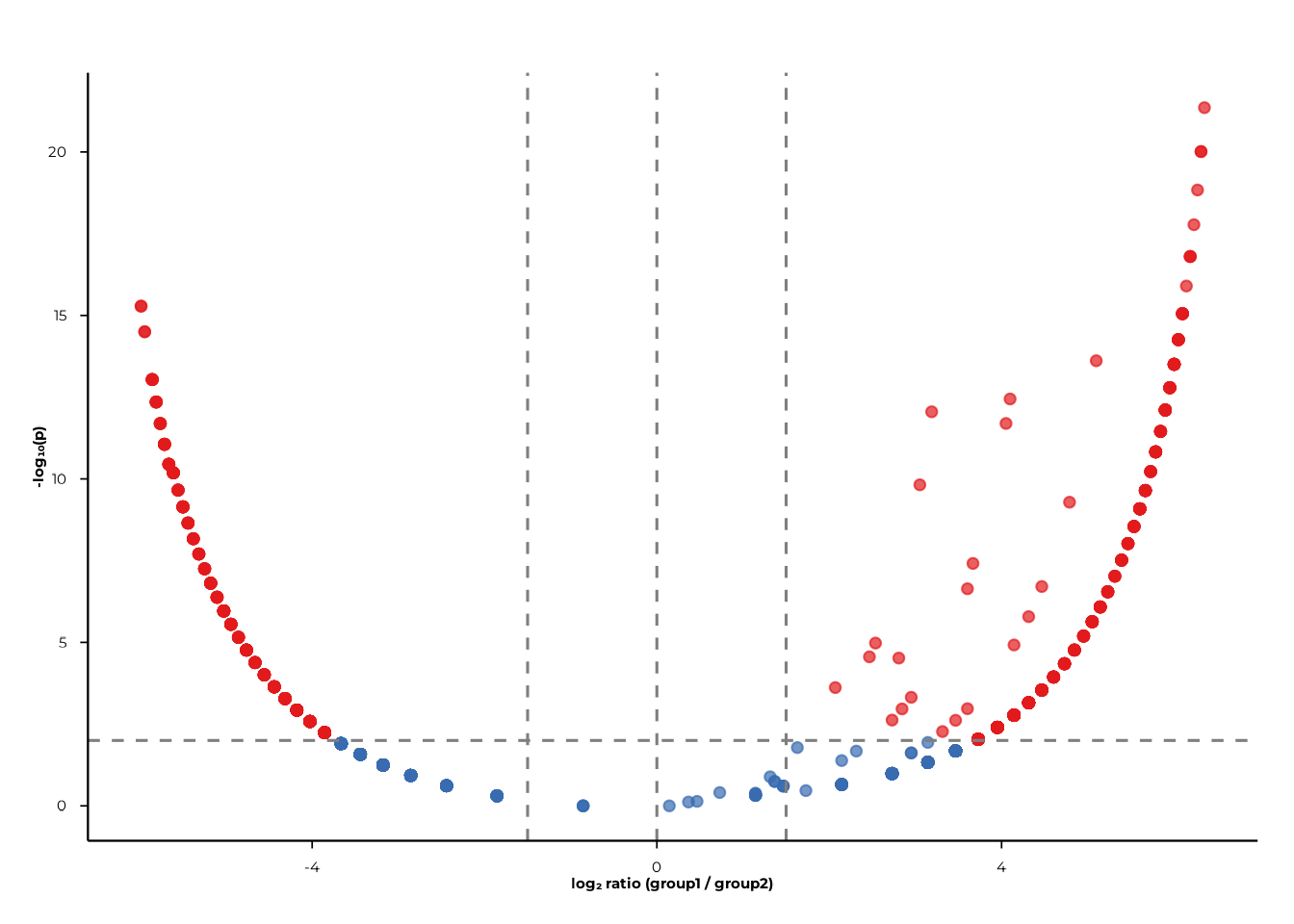
Cutoffs
fc_cut (absolute log₂ fold-change) and
p_cut (p-value) control where the dashed reference lines
are drawn and how significance categories are assigned.
volcano_static(
  pop_group,
  pair   = c("A", "B"),
  fc_cut = 1.5,
  p_cut  = 0.01
)
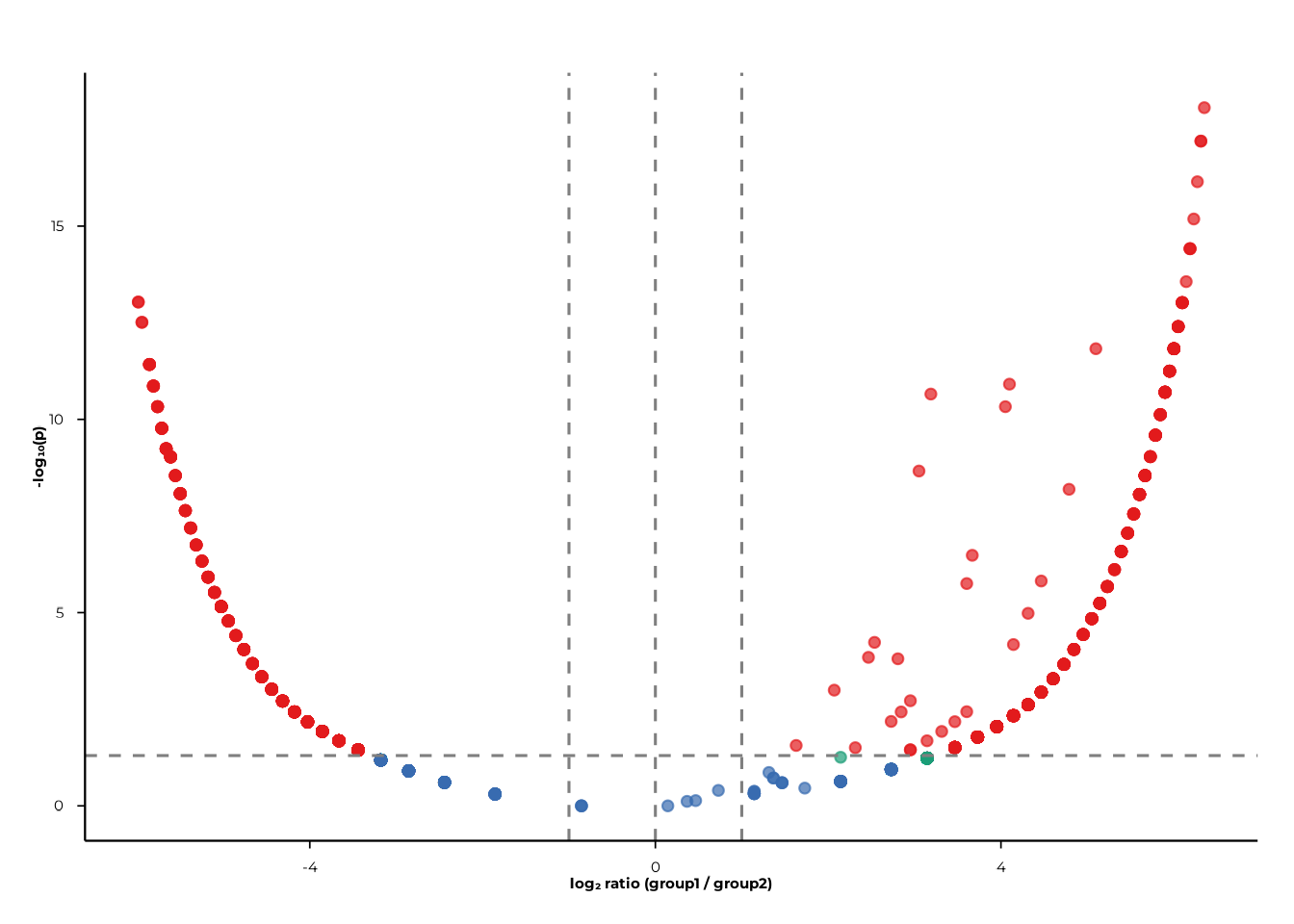
BH correction
Set p_mode = "bh" to apply Benjamini–Hochberg correction
per-plot. The y-axis then displays −log₁₀(p_BH).
volcano_static(
  pop_group,
  pair   = c("A", "B"),
  p_mode = "bh",
  p_cut  = 0.05
)
color_by— like the scatter plots,volcano_static()accepts acolor_byargument to highlight features by peptide-library metadata. This requires real library annotations and is not demonstrated here.
volcano_interactive() — plotly
volcano_interactive(
  pop_group,
  pair   = c("A", "B"),
  p_mode = "bh",
  p_cut  = 0.05,
  fc_cut = 1
)
Hovering over a point shows the feature identifier, rank, group labels, log₂ ratio, and −log₁₀(p).
Putting it all together
A typical POP analysis runs in three steps:
# 1. Compute prevalence
pop <- compute_pop(
  pd,
  rank_cols  = c("peptide_id", "family"),
  group_cols = "group"
)

# Optional paired comparison across timepoints
pop_paired <- compute_pop(
  pd,
  rank_cols  = "peptide_id",
  group_cols = "timepoint",
  paired     = "subject_id"
)

# 2. Scatter: prevalence in group A vs group B
scatter_static(pop, pair = c("A", "B"), xlab = "Group A (%)", ylab = "Group B (%)")
scatter_interactive(pop, pair = c("A", "B"), xlab = "Group A (%)", ylab = "Group B (%)")

# 3. Volcano: effect size and significance
volcano_static(pop,       pair = c("A", "B"), p_mode = "bh")
volcano_interactive(pop,  pair = c("A", "B"), p_mode = "bh")
Session info
sessionInfo()
#> R version 4.6.1 (2026-06-24)
#> Platform: x86_64-pc-linux-gnu
#> Running under: Ubuntu 24.04.5 LTS
#>
#> Matrix products: default
#> BLAS:   /usr/lib/x86_64-linux-gnu/openblas-pthread/libblas.so.3
#> LAPACK: /usr/lib/x86_64-linux-gnu/openblas-pthread/libopenblasp-r0.3.26.so;  LAPACK version 3.12.0
#>
#> locale:
#>  [1] LC_CTYPE=C.UTF-8       LC_NUMERIC=C           LC_TIME=C.UTF-8
#>  [4] LC_COLLATE=C.UTF-8     LC_MONETARY=C.UTF-8    LC_MESSAGES=C.UTF-8
#>  [7] LC_PAPER=C.UTF-8       LC_NAME=C              LC_ADDRESS=C
#> [10] LC_TELEPHONE=C         LC_MEASUREMENT=C.UTF-8 LC_IDENTIFICATION=C
#>
#> time zone: UTC
#> tzcode source: system (glibc)
#>
#> attached base packages:
#> [1] stats     graphics  grDevices utils     datasets  methods   base
#>
#> other attached packages:
#> [1] phiper_0.4.14
#>
#> loaded via a namespace (and not attached):
#>  [1] sass_0.4.10         utf8_1.2.6          future_1.76.0
#>  [4] generics_0.1.4      tidyr_1.3.2         listenv_1.1.0
#>  [7] digest_0.6.39       magrittr_2.0.5      evaluate_1.0.5
#> [10] grid_4.6.1          RColorBrewer_1.1-3  fastmap_1.2.0
#> [13] blob_1.3.0          jsonlite_2.0.0      DBI_1.3.0
#> [16] purrr_1.2.2         scales_1.4.0        codetools_0.2-20
#> [19] textshaping_1.0.5   jquerylib_0.1.4     duckdb_1.5.6
#> [22] cli_3.6.6           rlang_1.3.0         chk_0.11.0
#> [25] dbplyr_2.6.0        phiperio_0.6.1      future.apply_1.20.2
#> [28] parallelly_1.48.0   withr_3.0.3         cachem_1.1.0
#> [31] yaml_2.3.12         otel_0.2.0          parallel_4.6.1
#> [34] tools_4.6.1         dplyr_1.2.1         ggplot2_4.0.3
#> [37] globals_0.19.1      vctrs_0.7.3         R6_2.6.1
#> [40] lifecycle_1.0.5     fs_2.1.0            htmlwidgets_1.6.4
#> [43] ragg_1.5.2          pkgconfig_2.0.3     desc_1.4.3
#> [46] pkgdown_2.2.1       RcppParallel_6.2.1  pillar_1.11.1
#> [49] bslib_0.12.0        gtable_0.3.6        glue_1.8.1
#> [52] Rcpp_1.1.2          systemfonts_1.3.2   xfun_0.61
#> [55] tibble_3.3.1        tidyselect_1.2.1    knitr_1.52
#> [58] farver_2.1.2        htmltools_0.5.9     labeling_0.4.3
#> [61] rmarkdown_2.32      compiler_4.6.1      S7_0.2.2